1. Background and a bit of history

Since my early teens, I’ve loved music. My taste started with 70s Rock, Hard Rock, Heavy Metal, etc. But soon enough I started to enjoy other genres as well. Life was basically like this, save money to buy cassette tapes, raid uncles and family friends’ collections to record them.
After my father got us a Stereo, I started to buy records on top of recording tapes. I lived in a small town about 350 miles west of São Paulo, so the selection of records available was always lacking. So I took advantage of trips and vacations to acquire records that were not available locally.
By the time CDs came along, they were very expensive, the first one I got, almost 40 years ago, was a recording of the opera Don Giovanni and I knew about that recording, a 1967 release by Deutsche Grammophon. It was touted by the local choir maestro as the best ever. So I grabbed it, paid with 3 cheques, it was too expensive to buy it cash. I still have it to this day…
So, over the years life changed a lot, I stopped and started buying CDs over and over again. Sometimes the lull would last for years, but I always enjoyed grabbing new (to me) releases.
By now, after getting rid of almost 1000 CDs that did not make the cut I still have over 1000, and I am not done.
The issue with having this many CDs is that I don’t remember all CDs by heart and end up with duplicates often. This was my first incentive to come up with this automation.
2. The Idea
So, here I am with over 1000 CDs, several duplicates, and the need to organize them somehow. As I was looking at them I noticed most of them have barcodes and I thought that I could write a little program to read that and create a database of CDs for me since I had done something similar with books for another application.
After some consideration I decided not to do that, that would have worked, but I instead expanded on the idea a bit. So, the first idea was to have a database of CDs to avoid purchasing duplicate CDs, soon after I thought about my personal website. It would be nice to have them listed there. Also, I thought about saving them on a Google Sheet for easy access when I am not home.
The idea of an automation started to take shape.
3. The Project
So here we are with an idea to create an automation to read the CDs barcodes, download the CD information, save that on a Google Sheet and add them to my website. After some thought and some research I found out that Discogs had an application that allowed users to maintain their collection there for free. Also, since I wanted to have the CDs on my personal website, I decided to use AI to make articles in English and Portuguese about each CD.
Finally I was ready to get started!
4. The Workflow

Here’s a brief explanation of how to I created the workflow to acheve all the project’s scope and a bit more.
a. Display the form, display a simple form to get the CD Barcode and the favorite flag: this is pretty straightforward, grab the CD barcode, also allow the user select a checkmark to assign the CD as one of my favorites. Send the barcode to MusicBrainz to get the CD information. When I first tried there was a little issue with the data. The CD might be part of a series of releases, bootlegs, etc. So I had a payload with several releases.

So to solve the issue with the payload with different releases, I made sure to get only the official releases (I don’t have bootlegs on my collection) and sent them back to the form.

With that information coming back to the form, it displays a Select a release dropdown with the available options.
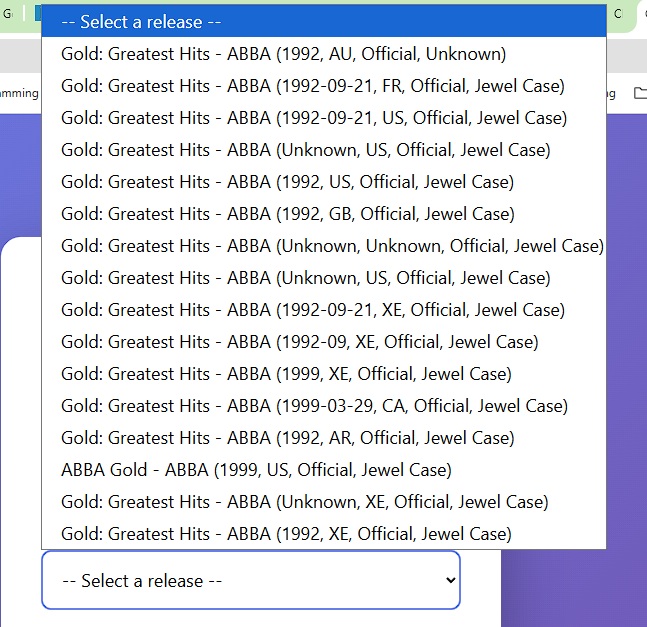
I look at the list to choose the closest one.
NOTE: sometimes, if the information is missing, it’s a good idea to create an account with MusicBrainz and enter the missing information. I did that to a lot of missing CDs and missing data. Some CDs did not have its barcode saved in the MusicBrainz database. I added the barcode and fixed any mismatching information. This is a good idea to help the community and enrich an already important resource for music lovers all over the world.
After selecting the correct release, the workflow then goes forward to enrich the data for that CD.
b. Get CD related music genres. With the specific release selected, I go back to the MusicBrainz to fetch the list of music genres related to that CD. After that I get the full details for that release and then I format them to use on the rest of the process
c. Get CD Cover art. I them download the CD cover art from MusicBrains. Soon as I started testing, I noticed some releases were missing the cover art. To avoid errors, I created a fallback, if there’s no cover art in MusicBrainz data, .I fall back to Discogs, checking the master release first since that’s typically where the canonical cover art is stored.
But, sometimes the cover art is also missing from Discogs. So I created a fallback where I ask AI, using OpenAI’s image generation model to create an image to use later with the post.
d. Generate articles about that CD in English and Portuguese. By now, I have all the data I want to use for that CD. The title, artist, tracklist, genres, release date, original release date, and the cover image. With that I make a call to AI again to generate the articles, formated with Album Details, Track Listing, Album Information, Recording Information, Band Context, and Track Commentary.
e. Genres. This was a pickle, music genres are more varied than corn varieties in Peru! But I wanted that information to enrich the data for each CD. My idea was to map genres to WordPress categories starting from 2 main categories; Music for genres in English and Música for genre translations.
There were quite a few issues with that. First, genre translations, some music genres map cleanly to Portuguese, others don’t havean accepted translation at all, so I built a lookup table – and even then, keeping the keeping the English and Portuguese category trees in sync as new genres appear has been an ongoing refinement.
f. Publish WordPress Articles, so by now I have the CD information with track list and music genres. I use that to post the articles in English and Portuguese to my website.
g. Add to Discogs Collection, at first I was just going to add the CD to the Discogs collection, but since it’s going to be a lot of CDs, I checked if there was a way to organize the CDs somehow. Discogs allow you to create folders for your collection. I decided to create folders by artist. I figured it would be useful when I am out buying CDs. With that in mind I first checked and created the artist folder, then added the CD to the Discogs collection.
h. Add the CD to Google Sheets, finally, this completes the process and save the record barcode, title, artist, release date, original release date, English post link, Portuguese post link, MusicBrainz link, ID, and favorite flag to the sheet.
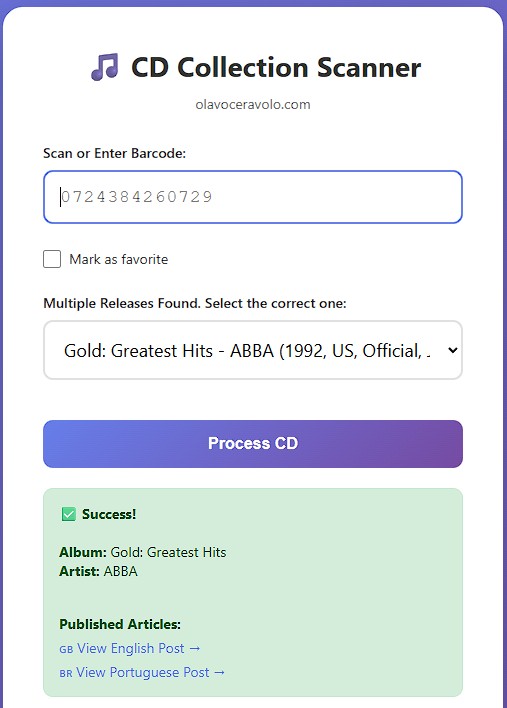
i. Response, I send back to the form if the process was a Success, the album title and artist and a link to the English and Portuguese posts.
If you’re dealing with a similar mess of scattered data and manual entry in your business, this is exactly the kind of workflow I build for clients – reach out if you’d like to talk about automating it.